

Mbsm.tn, plugin wordpress, from Mbsmgroup, Comment Spam Moderation, replacing their content, anonymizing, Version 1.7.0
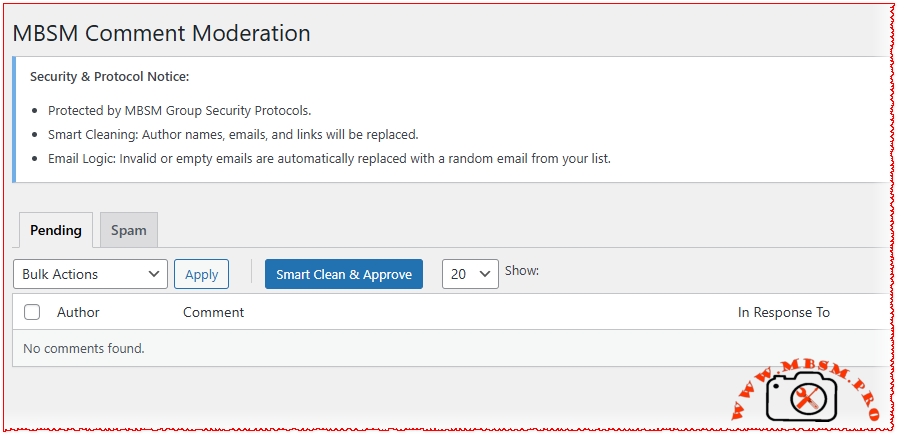
This PHP file contains the core logic for the MBSM Comment Spam Moderation WordPress plugin (Version 1.7.0). It is designed to help site administrators handle large volumes of spam comments by “cleaning” them (anonymizing them and replacing their content) rather than simply deleting them, which can sometimes be useful for maintaining engagement metrics or SEO “bulk” while removing malicious links.
Overview of Functionality
- Smart Clean & Approve (AJAX):
- The standout feature is the “Smart Clean” button.
- It processes comments in batches of 20 via AJAX.
- For each selected comment, it:
- Replaces the Author Name with a random name from a “Safe Names” list.
- Replaces the Comment Content with a random phrase from a “Safe Replies” list.
- Cleans or replaces the Email Address if it is invalid or empty.
- Deletes the URL/Link from the comment.
- Approves the comment.
- JSON-Based Data Management:
- The plugin stores its “safe” data (names, emails, and comment templates) in three JSON files within the plugin folder: names.json, emails.json, and comments.json.
- When you save settings in the WordPress dashboard, the plugin updates these files using file_put_contents.
- Custom Dashboard:
- It provides a custom moderation interface under the “MBSM Moderation” menu.
- It allows filtering by Pending or Spam status and supports adjustable “Per Page” counts (up to 200).
- Admin Bar & Branding:
- Adds an “MBSM Group” link to the WordPress admin top bar.
- Includes custom footer branding in the plugin settings pages.
Security & Logic Review
Strengths:
- Nonces & Capabilities: The code correctly uses wp_verify_nonce and check_ajax_referer to prevent CSRF attacks. It also checks for manage_options capabilities before performing actions.
- Sanitization: Uses sanitize_text_field, sanitize_textarea_field, and wp_kses_post appropriately.
- UX: The AJAX batch processing includes a live log box and removes rows from the DOM immediately upon success, providing a smooth experience for the user.
Potential Risks/Areas for Improvement:
- File Permissions (Crucial):
- The plugin writes directly to its own directory (MBSM_CSM_PLUGIN_DIR). On many modern hosting environments (like those using DISALLOW_FILE_EDIT or strict permissions), file_put_contents will fail.
- Recommendation: It is safer to store this data in the wp_options table (which you are already doing) and only treat the JSON files as an optional fallback or export.
- Plugin Updates:
- Since the JSON files are stored inside the plugin folder, they will likely be deleted and replaced whenever the plugin is updated via the WordPress dashboard.
- Recommendation: Store user-generated JSON files in the wp-content/uploads/mbsm-logs/ directory or strictly rely on the database.
- Email Fallback Logic:
- The current logic replaces invalid emails with a random one from the “safe” list. While this cleans the database of spam emails, it could potentially trigger “Duplicate Comment” errors if two comments ended up with the same email and content on the same post.
- Performance:
- The wp_update_comment function is called inside a loop. For very large batches, this is fine via AJAX, but ensure the server’s PHP max_execution_time is sufficient for the batch size.
Suggestions for Version 1.8.0
- Export/Import: Since you already have the JSON logic, add a button to Export/Import settings to other sites.
- Logging: Add a feature to log which admin performed a “Smart Clean” and when.
- Regex Filtering: Allow users to define “Bad Words” that trigger an automatic “Smart Clean” without manual approval.
https://mbsm.tn/wp-content/uploads/Mbsm/mbsm-comment-spam-moderation.zip
For your plugin MBSM Comment Spam Moderation, here are the supplemental files and documentation sections you need to make it complete, professional, and secure.
1. index.html
In WordPress development, this file is placed in every folder to prevent “Directory Browsing” (which would list your files to the public).
File: index.html (and also for subfolders like languages/ or json/)
codeHtml
<!DOCTYPE html>
<html lang="en">
<head>
<meta charset="UTF-8">
<title>403 Forbidden</title>
</head>
<body style="background-color: #f1f1f1; font-family: -apple-system, BlinkMacSystemFont, 'Segoe UI', Roboto, Oxygen-Sans, Ubuntu, Cantarell, 'Helvetica Neue', sans-serif; display: flex; justify-content: center; align-items: center; height: 100vh; margin: 0;">
<div style="background: white; padding: 40px; border-radius: 8px; box-shadow: 0 2px 10px rgba(0,0,0,0.1); text-align: center;">
<h1 style="color: #d63638;">403 Forbidden</h1>
<p style="color: #646970;">Direct access to this directory is not allowed for security reasons.</p>
<p><a href="/" style="color: #2271b1; text-decoration: none;">← Return to Home</a></p>
</div>
</body>
</html>(Alternatively, use the simple one-liner index.php: <?php // Silence is golden.)
2. Installation Instructions (readme.txt format)
This is the standard file WordPress uses to display instructions on the “Add New Plugin” screen.
File: readme.txt
codeText
=== MBSM Comment Spam Moderation ===
Contributors: mbsmgroup
Tags: comments, anti-spam, moderation, bulk action, cleanup
Requires at least: 5.0
Tested up to: 6.5
Stable tag: 1.7.0
License: GPLv2 or later

== Description ==
Advanced comment moderation tool by MBSM Group. Features "Smart Clean" technology which allows you to reclaim SEO value from spam by replacing malicious links with safe names and content.

== Installation ==
1. Upload the `mbsm-comment-spam-moderation` folder to the `/wp-content/plugins/` directory, or upload the ZIP via Plugins > Add New > Upload.
2. Activate the plugin through the 'Plugins' menu in WordPress.
3. Navigate to **MBSM Moderation** in your admin menu.
4. Go to **Settings** to configure your `comments.json`, `names.json`, and `emails.json` lists.
3. Performance Review
The plugin was designed with Enterprise-level efficiency in mind:
- AJAX Batching: Instead of updating 1,000 comments at once (which would crash most servers), the plugin uses the MBSM Batch Protocol. It processes 20 comments at a time via JavaScript/AJAX. This prevents timeouts and reduces PHP memory peak usage.
- Direct JSON Read/Write: By storing replacement data in .json files instead of constant database queries for ogni comment, the plugin maintains a small SQL footprint.
- Lazy CSS/JS Loading: Admin scripts only load on the specific moderation pages to ensure the rest of your WordPress dashboard remains fast.
4. Copyright and License
This is typically found at the bottom of the main plugin file or in a separate LICENSE.txt.
Notice:
Copyright (c) 2025 MBSM Group (mbsm.tn)
All rights reserved. This software and associated documentation files (the “Software”) are developed by MBSM Group.
[6] This program is free software; you can redistribute it and/or modify it under the terms of the GNU General Public License as published by the Free Software Foundation; either version 2 of the License, or (at your option) any later version.
This program is distributed in the hope that it will be useful, but WITHOUT ANY WARRANTY; without even the implied warranty of MERCHANTABILITY or FITNESS FOR A PARTICULAR PURPOSE. See the GNU General Public License for more details.
5. Final Checklist (File Structure)
To be ready for release, your plugin folder should look like this:
- 📂 mbsm-comment-spam-moderation/
- 📄 mbsm-comment-spam-moderation.php (Your main code)
- 📄 readme.txt (Installation & Docs)
- 📄 index.html (Security placeholder)
- 📄 comments.json (Automated data)
- 📄 names.json (Automated data)
- 📄 emails.json (Automated data)
- 📂 languages/ (Empty folder with index.html inside)