
 Mbsm.tn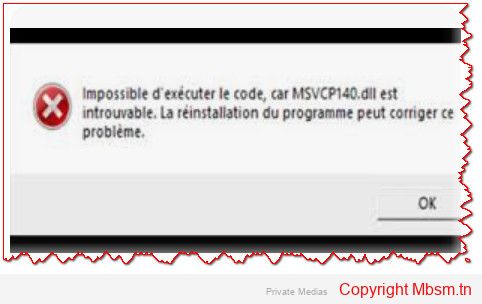


When you encounter an error message indicating that the vcruntime140d.dll file is missing or not found while running an application like appserv-x64-9.3.0, it usually means that the application depends on the Visual C++ Redistributable library that contains this file. In the case of the error mentioning vcruntime140d.dll, it indicates that the application is looking for a development-specific version of the library (the d in the filename denotes the debug/development version).
To resolve this issue, you can follow these steps:
1. Install the Visual C++ Redistributable Library
Most of the time, the application requires you to install the Microsoft Visual C++ Redistributable. You can download and install it from Microsoft’s official website:
- Download Visual C++ Redistributable 2015-2019
- Make sure to install the version that matches your system (64-bit or 32-bit).
2. Use the Correct Version of vcruntime140.dll
As mentioned, vcruntime140d.dll is the version meant for development. If you’re working in a production environment or on a machine that doesn’t have development tools like Visual Studio, you may need to use the regular version of vcruntime140.dll instead of the debug version.
- You can search for the regular version (
vcruntime140.dll) online and download it from trusted sources like Microsoft’s official website or trusted software distribution platforms.
3. Place the File in the Correct Folder
- In the Same Folder as the Application: Place the
vcruntime140.dllfile in the same folder where the application throwing the error is located. - In the System Folder: You can also try placing the file in system folders like:
C:\Windows\System32(for 64-bit systems)C:\Windows\SysWOW64(for 32-bit systems)
4. Restart the Computer
After installing the Visual C++ Redistributable or adding the file to the correct folder, restart your computer to ensure the changes take effect properly.
5. Check the Application Version
If you’re using a custom or beta version of the application (like appserv-x64-9.3.0), make sure it is compatible with the installed version of the Visual C++ libraries.
If the issue persists, you may need to install Visual Studio or development tools, which might include the missing file.

Very human writing. Refreshing.
Saved for later – thanks!
Thank you for not wasting my time.
Clean and helpful – rare combo.
I feel smarter already.
You’ve got a new regular reader.
This helped me a lot, seriously.
Very pleasant read.
Short, clear, perfect.
You’ve helped more than you know.
I’ll use this weekly.
Thank you for your sharing. I am worried that I lack creative ideas. It is your article that makes me full of hope.
This is the kind of content I pay for.
I appreciate the effort here.
Short, clear, perfect.
Thank you from the bottom of my browser.
This stays in my bookmarks forever.
Exactly what I needed, no more no less.
Already sent this to my group chat.
This is gold. Thank you.
Bookmarked, liked, and noted.
Real talk? This helped a lot.
This is why I love the internet.
Simple as it should be.
You’ve helped more than you know.
Helped me more than you think.
Very straightforward. I like it.
Thank you, kind stranger (writer).
You made my day easier.
Thank you for not wasting my time.
Wish I found this earlier.
Used it right away. Worked perfectly.
This will save me hours.